Rolling Icon: 3D Wallpaper
- 4.2
- Rating
- 10.00M
- Installs
- Free
- Price
 Analysis by App-foxy
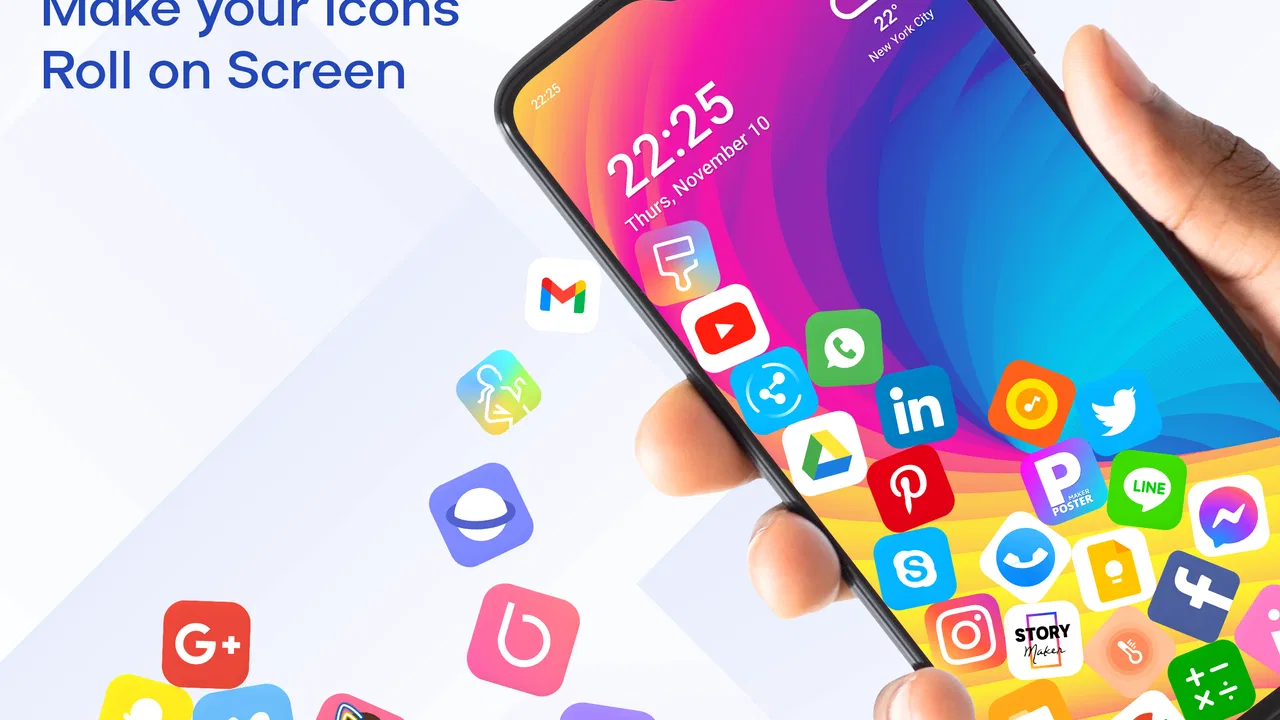
I installed Rolling Icon: 3D Wallpaper because I wanted my home screen to feel less static without replacing it with a busy animated scene. The idea is simple but unusually physical: app icons move across a live wallpaper and react to the device’s real-world gravity. In daily use, that makes the phone feel playful whenever I tilt or pick it up, while the familiar icons remain the starting point for opening apps.
This is a free personalization app from Maxlabs Personalization Tools, aimed at anyone who likes changing the look and feel of Android rather than settling for the default launcher appearance. It is rated for Everyone, and its broad appeal is easy to understand: there is no complicated creative project to learn, and the result is visible immediately on the home screen. Still, the effect is more specific than a normal wallpaper, so whether it suits you depends on how much motion you actually want during ordinary phone use.
From a static home screen to a moving setup
My starting point was a normal Android home screen with icons arranged in the usual grid. That arrangement is efficient, but it also makes the phone look like every other phone. Rolling Icon changes the visual layer by turning those icons into moving objects. The important distinction is that this is not merely a looping animation playing behind the shortcuts. The motion is connected to gravity, so the phone’s orientation becomes part of the experience.
You May Also Like

 Blood Strike: 2.5 Anniversary
Blood Strike’s Loadouts Turn Every Drop Into a Tactical Gamble
A close look at Blood Strike’s custom loadouts: how fast access to signature weapons reshapes its battle royale rhythm, rewards preparation, and narrows the gap between fights.

 Pandora - Music & Podcasts
Pandora’s Music Is Easy to Start, but Harder to Recover
Pandora’s strength is its low-effort path from a seed to a station. Its weak spot is how much confidence it asks you to place in connection, setup, and quiet recovery.

 8 Ball Pool
 Is Built on Rivalries, Rematches, and Routine
A close look at the rivalries, rematches, shared routines, and unanswered safety questions that turn a quick pool match into a persistent mobile community.

 Samsung Music
’s Quiet Strength Is Playing What You Already Own
Its reach comes less from spectacle than from dependable access to a personal library. That simplicity is both the app’s strongest retention engine and its ceiling.

 AccuWeather: Weather Radar
AccuWeather Review: A Quick, Clear Forecast for Everyday Decisions
For everyday plans, the best forecast is the one you can understand quickly. AccuWeather makes rain timing, radar, and local conditions easy to act on, with a few trade-offs.

 Hill Climb Racing
Why Hill Climb Racing Still Turns Crashes Into One More Run
A tiny car, a bumpy hill and one more upgrade: Hill Climb Racing keeps resurfacing because its simple chaos makes every near-miss feel personal.
More From Our News Desk



The first useful question is not “does it look impressive?” but “will this movement help or annoy me?” If you enjoy playful customization, the answer is likely positive. If you prefer a perfectly still display, the central feature will feel like unnecessary activity. I found it most appealing when I treated it as a visual accent rather than a replacement for the phone’s entire interface.
The app belongs to the personalization category, and that matters when comparing it with the usual alternatives. A standard wallpaper changes the background only. A launcher changes how the home screen is organized and may introduce new gestures, menus, and icon layouts. A widget-focused setup adds information such as weather or calendars. Rolling Icon takes a narrower route: it concentrates on the icons themselves and makes their movement the main event.
That narrow focus is also its strength. I did not need to redesign every screen to notice a difference. The home screen kept its familiar purpose, but the icons gained a physical quality. For someone who wants a quick visual experiment instead of a full interface overhaul, that is a sensible trade-off.
Setting expectations before using it
The app has been available since September 10, 2018, and the current release is version 7.4.9. It supports Android from version 6.0 onward, so it is relevant to a wide range of devices, including older phones that cannot use some newer personalization tools. It has passed ten million installs and holds a 4.4 average from around sixty-eight thousand ratings, with roughly one thousand three hundred written reviews. Those figures suggest that the concept has found a substantial audience, but they do not remove the need to decide whether motion-based customization fits your habits.
I would approach it as a visual novelty with practical home-screen consequences, not as a productivity tool. It does not make finding an app inherently faster, and it is not meant to replace a launcher’s organizational controls. Its value comes from changing the feeling of the device every time the home screen appears.
One detail worth considering is the age rating. Because the app is suitable for Everyone, it can work well as a light customization choice on a shared family device or on a phone used by someone who wants something more expressive without an intimidating setup. That does not mean every person will enjoy the animation, but the concept itself is accessible.
The setup flow and the first handoff
The workflow begins with the app and ends with Android displaying the result as a live wallpaper. That handoff is important: the experience is not confined to an app window. Once the wallpaper is active, the home screen becomes the place where the effect is judged. I recommend setting it up when you have a moment to look at the phone from different angles rather than activating it while rushing through your morning.
After choosing to use the live wallpaper, I would check the home screen with the phone held normally, then tilt it gently in several directions. This gives a better impression than watching a demonstration inside the app. The point is to see whether the icons remain visually readable while moving and whether the effect feels natural with the way you hold your phone.
A useful everyday test is to open the phone while standing, then again while it is lying flat on a desk. Those are different situations. A wallpaper that feels charming while the phone is in your hand may feel distracting when you are trying to locate one shortcut quickly on a table. Testing both positions helps separate the novelty from the practical experience.
The next handoff is between customization and routine use. You choose the visual behavior once, but then the phone’s orientation keeps influencing what you see. That means the app’s success depends on consistency. If the movement looks pleasant at normal angles and does not make the icons difficult to identify, it can become a small part of the phone’s personality. If the icons constantly shift away from where you expect them, the same feature becomes friction.
A realistic morning workflow
Imagine checking the phone after an alarm, while it is still on a bedside table. You pick it up, the display wakes, and the icons respond as the device changes angle. You then move to a desk, place the phone down, and return to it several times during the morning. In that scenario, Rolling Icon adds a small moment of movement each time the home screen appears. The benefit is emotional rather than functional: the device feels less mechanical.
The drawback is that the home screen becomes less visually predictable. I personally found that I had to stop judging it like a fixed grid. The icon positions may look different from one glance to the next, so muscle memory and quick tapping are not always as comfortable as with a conventional arrangement. This is not a deal-breaker for occasional use, but it is a real consideration for anyone who opens the same app dozens of times a day.
My practical tip is to keep the first home screen relatively simple. Put only the shortcuts you use most often there and leave less important apps on later pages or in folders. That way, the moving effect has fewer competing elements, and you can still reach essential apps without scanning a crowded display. This is a workflow improvement rather than a hidden feature, but it makes a noticeable difference to the experience.
How it compares with normal personalization tools
Compared with a still wallpaper, this app offers a stronger sense of interaction. A still image can change the mood of the phone, but it does not respond when you rotate the device. Rolling Icon makes the phone’s physical movement visible, which is the reason to choose it over a conventional background.
Compared with a launcher, however, it is less useful for organization. A launcher is the better choice if your main goal is custom icon packs, app drawers, gesture controls, or carefully arranged pages. Rolling Icon is better when layout is already acceptable and you mainly want the icons to behave differently. Installing it for launcher-style control would create the wrong expectation.
It also differs from information-heavy live wallpapers. Some animated backgrounds are designed to display scenery, weather, clocks, or elaborate visual scenes. This app keeps attention on the icons and their movement. That makes it easier to recognize the purpose of the home screen, but it also means the visual payoff depends heavily on whether you enjoy this particular rolling effect.
For a minimalist user, the trade-off is clear. A static background with a few carefully placed shortcuts will look calmer and may feel faster. For a person who sees the phone as a customizable object, this app offers a more tactile alternative without demanding a complete redesign.
Where the workflow becomes less comfortable
The main point of friction is motion itself. The same gravity-based behavior that makes the wallpaper distinctive can interfere with quick recognition. If you are accustomed to tapping an icon in a fixed location, a moving arrangement may require an extra glance. That is especially relevant when you are distracted, walking, or trying to use the phone one-handed.
There is also a difference between watching the effect for a minute and living with it for a week. Novelty is strongest at the beginning. Some users will continue enjoying the playful response, while others may eventually prefer to return to a quiet background. I would not install it expecting a permanent improvement in efficiency. I would install it because I genuinely like the visual behavior and want the option to change the phone’s atmosphere.
Another limitation is that the app’s appeal is concentrated in one idea. If you want broad customization controls, this may feel narrow. The free availability makes experimenting easy, but the app also includes in-app purchases ranging from $4.99 to $39.99 per item. Before paying for anything, I would spend enough time with the basic experience to decide whether the core motion remains enjoyable after the first impression. A purchase makes sense only if it adds something you personally value; it should not be necessary to justify trying the app.
Battery and performance are also sensible things to observe on your own device when using any live wallpaper. I would not assume that every phone will behave identically, especially across older and newer hardware. If you notice that the home screen feels less responsive or that you simply dislike continuous animation, switching back to a static wallpaper is the more sensible choice.
Small techniques that improve the result
First, judge the wallpaper with your normal grip rather than holding the phone unnaturally for a demonstration. Gravity-based movement is most useful when it matches real handling. A setup that looks good only when the phone is tilted dramatically may become tiring in everyday use.
Second, reduce visual competition around the moving icons. A crowded home screen makes the effect harder to read and makes it more difficult to locate a shortcut. Keeping the primary screen focused gives the animation room to be noticed without turning every opening of the phone into a search task.
Third, use it as a mood change rather than a permanent commitment. I can see it working particularly well on a secondary device, a family phone, or a personal phone where visual personality matters more than strict efficiency. If your phone is mainly a work tool and you need fixed, instantly recognizable shortcuts, a conventional wallpaper or launcher is likely the better handoff from screen to task.
Finally, test the home screen after placing the phone on different surfaces. A desk, a sofa, and a bedside table all encourage different angles. This simple check reveals whether the movement remains pleasant when the phone is not held upright. It is one of the easiest ways to decide whether the app will fit your actual routine instead of an idealized demo.
Who should try it and who should skip it
I recommend Rolling Icon to people who enjoy unusual visual details, like experimenting with Android personalization, and do not mind that their home screen is less static. It is also a good low-commitment option for someone who wants a noticeable change without learning a new launcher or rebuilding an entire layout.
I would be more cautious if you rely heavily on fixed icon positions, use the phone in a hurry, or prefer a calm interface. People who organize their home screen around precise muscle memory may find the rolling behavior more disruptive than entertaining. The same is true for anyone looking for widgets, deep layout control, or a complete replacement for the standard launcher experience.
The app is free to start, works with Android 6.0 and later, and comes from Maxlabs Personalization Tools. Those details make it easy to test on a compatible device without treating the installation as a major commitment. The presence of optional purchases means I would still evaluate the everyday experience first and decide later whether extra customization is worth the cost.
After using it, my view is that the app succeeds when judged on its own terms. It does not make the phone more organized, and it will not suit everyone who wants a wallpaper. What it does is give the home screen a physical, responsive character that ordinary backgrounds cannot provide. The best result comes from accepting the movement instead of expecting a fixed grid with a decorative background.
For me, the deciding question is simple: do you want your icons to feel like part of a small animated object, or do you want them to stay exactly where you left them? If the first answer sounds appealing, Rolling Icon: 3D Wallpaper is worth trying. If the second answer describes your habits, a still wallpaper or a full-featured launcher will probably deliver a cleaner and more dependable daily experience.
FAQs for Rolling Icon: 3D Wallpaper
01What is Rolling Icon: 3D Wallpaper and what does it do?
Rolling Icon: 3D Wallpaper is a customizable app that provides interactive 3D wallpaper features for your smartphone. It allows users to transform their device’s home screen with rolling icons that respond to touch and motion, creating a dynamic and visually appealing experience. The app supports various themes and customization options to personalize your device.
02Is Rolling Icon: 3D Wallpaper compatible with my device?
Rolling Icon: 3D Wallpaper is compatible with most Android devices running version 4.1 and higher. It's important to check the app’s requirements on the Google Play Store to ensure it is supported by your specific device model. Unfortunately, this app is not currently available for iOS users.
03Does Rolling Icon: 3D Wallpaper consume a lot of battery?
While Rolling Icon: 3D Wallpaper enhances the visual appearance of your device, it may consume more battery than static wallpapers due to its interactive and dynamic features. However, the app is optimized to minimize battery usage, and users can adjust settings to further reduce energy consumption if necessary.
04Can I customize the themes and icons in Rolling Icon: 3D Wallpaper?
Yes, Rolling Icon: 3D Wallpaper offers a variety of customization options. Users can choose from multiple themes, change icon styles, and adjust the sensitivity and speed of the rolling animations. This allows for a personalized experience tailored to individual preferences and device aesthetics.
05Is Rolling Icon: 3D Wallpaper free to use, or does it have in-app purchases?
Rolling Icon: 3D Wallpaper is free to download and use, but it does offer in-app purchases for additional themes, icons, and premium features. These optional purchases can enhance the user experience, but the free version provides a substantial amount of customization options for most users.
Pros
- Dynamic and interactive wallpaper design.
- Customizable icon themes and layouts.
- Low battery consumption for a live wallpaper.
- Smooth performance with minimal lag.
- Enhances device's visual appeal significantly.
Cons
- Limited free customization options.
- May slow down older devices slightly.
- Ads can be intrusive at times.
- Occasional crashes on some models.
- Requires consistent updates for new features.

Rolling Icon: 3D Wallpaper
Gallery